
Sometimes we see others installing software on macOS using the following command, which is very convenient.
1 | brew install package |
This article will introduce how to install Homebrew on macOS 15 so that this command works on your Mac as well. At the same time, Git will also be installed.
What is Homebrew
Homebrew is a free and open-source software package management system designed to simplify the installation of software on macOS. It has many practical functions such as installing, uninstalling, updating, viewing, and searching. With a simple command, you can manage software packages, making it extremely convenient and fast.
Installing Homebrew
Open the terminal program. To open or quit Terminal on Mac:
- Launchpad > Other > Terminal
- Use Launchpad or press
Command⌘ + Spaceto open Spotlight search, then search for Terminal or Terminal.app.
Installation from Official Source
If you cannot access GitHub, please refer to the section on using mirror sources for installation.
Copy the installation command:
1 | /bin/bash -c "$(curl -fsSL https://raw.githubusercontent.com/Homebrew/install/HEAD/install.sh)" |
Execute the installation command in the terminal. During installation, you will need to enter your computer password for authorization:
1 | ==> Checking for `sudo` access (which may request your password)... |
Brew will display the software it will install and the folders it will create. Press Enter to continue and wait for the download and installation to complete.
After it finishes, running brew -v to test might still show the error zsh: command not found: brew.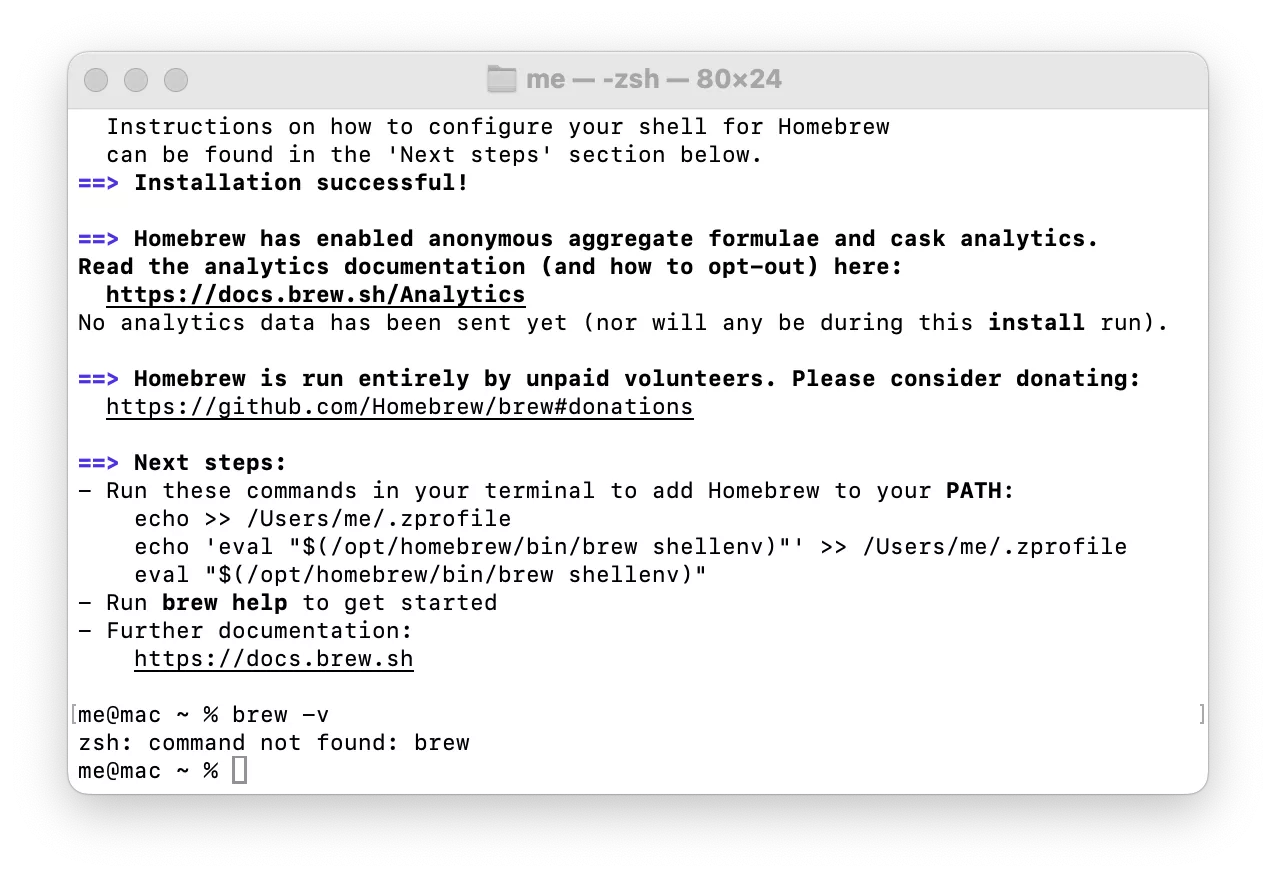
You need to copy and execute the following three commands as prompted to add Homebrew to your PATH:
1 | echo >> /Users/me/.zprofile |
If oh-my-zsh is used, run the following commands:
1 | echo 'export PATH="/opt/homebrew/bin:$PATH"' >> ~/.zshrc |
For bash users:
1 | echo 'export PATH="/opt/homebrew/bin:$PATH"' >> ~/.bashrc |
Then you can run brew -v to test the installation, which will successfully display the Homebrew version number.
1 | >brew -v |
Now we can use the brew install command.
Installation from Mirror Sources (Mainland China)
Mainland China users are recommended to use mirror sources for installation.
You can directly use the following installation script:
1 | /bin/zsh -c "$(curl -fsSL https://gitee.com/cunkai/HomebrewCN/raw/master/Homebrew.sh)" |
Or check the content below:
Replacing with the Alibaba Mirror Source
1 | echo 'export HOMEBREW_API_DOMAIN="https://mirrors.aliyun.com/homebrew-bottles/api"' >> ~/.zshrc |
1 | echo 'export HOMEBREW_API_DOMAIN="https://mirrors.aliyun.com/homebrew-bottles/api"' >> ~/.bash_profile |
Then run the installation command to download the installation script from Alibaba Cloud and install Homebrew:
1 | git clone https://mirrors.aliyun.com/homebrew/install.git brew-install |
You can also fetch the official installation script from GitHub to install Homebrew:
1 | /bin/bash -c "$(curl -fsSL https://github.com/Homebrew/install/raw/master/install.sh)" |
Test:
1 | brew -v |
Using Homebrew
Installing Software
1 | # Search for software |
Software Management
1 | # List installed software |
Service Management
1 | # List all services |
Others
1 | # Check Homebrew status |
Uninstalling Homebrew
1 | /bin/bash -c "$(curl -fsSL https://raw.githubusercontent.com/Homebrew/install/HEAD/uninstall.sh)" |
Reference: Installing & Configuring Homebrew on macOS

Comments