
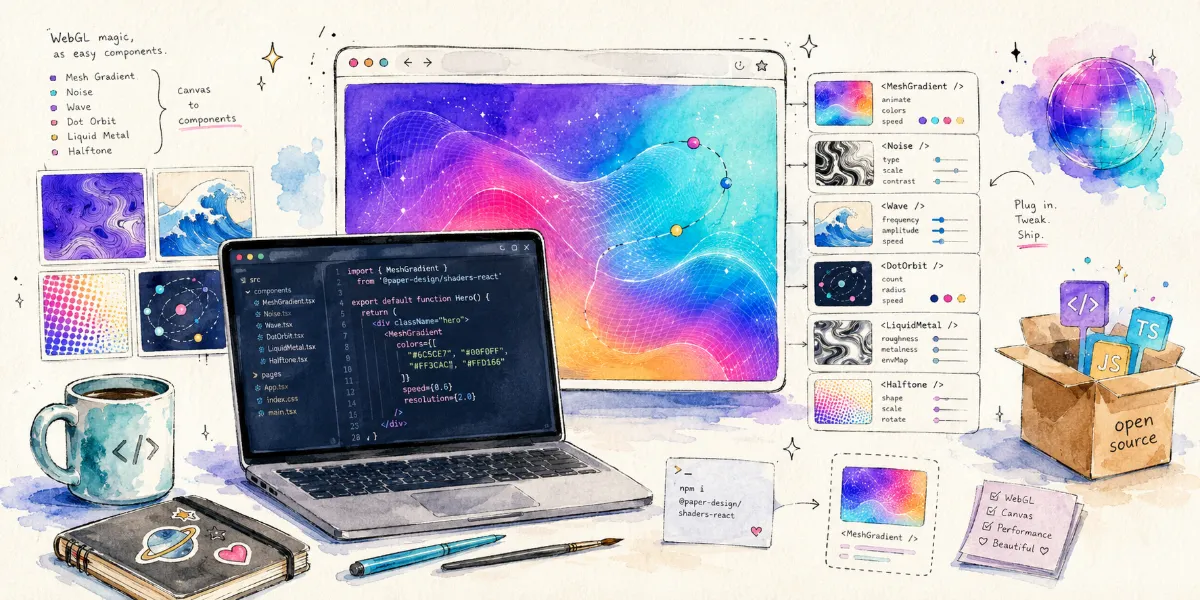
If you've ever worked on frontend visual effects, you've likely run into an awkward problem:
Standard CSS is convenient, but once you want to create more complex dynamic textures, noise, gradients, glass, liquid metal, or particle backgrounds, you're easily forced to dive into WebGL, Three.js, GLSL, and a mountain of boilerplate initialization code.
And Paper Shaders is designed to solve exactly this problem.
It is a set of zero-dependency Canvas / WebGL Shader components open-sourced by the Paper Design team. You can install and use it directly via npm, or visually adjust it in the Paper design tool before exporting the code. The project is currently hosted on GitHub and open-sourced under the Apache 2.0 license. The official positioning is "ultra fast zero-dependency shaders for your designs".
What is Paper Shaders?
Simply put, Paper Shaders is a library of visual effect components that you can drop directly into your webpages.
It wraps the complex process of writing GLSL from scratch, configuring the WebGL context, and handling the Canvas rendering loop into something that feels much closer to standard frontend components. For React projects, you can install it directly:
1 | npm i @paper-design/shaders-react |
If you're not using React, you can also install the vanilla version:
1 | npm i @paper-design/shaders |
The official README also warns that the project is currently in the 0.0.x version stage and may undergo breaking changes, so it is recommended to lock your dependency version.
What Effects Can It Produce?
Paper Shaders comes built-in with many visual effects suitable for modern website design. The official showcase site categorizes them into several types:
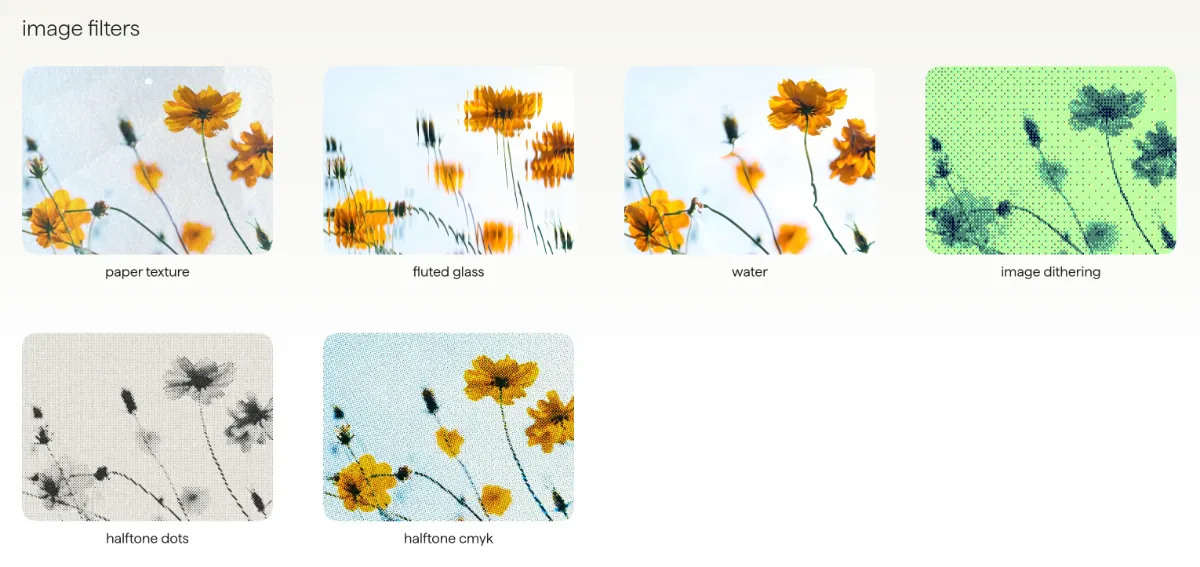
Image Filters:
Such as paper texture, fluted glass, water, image dithering, halftone dots, and halftone cmyk.
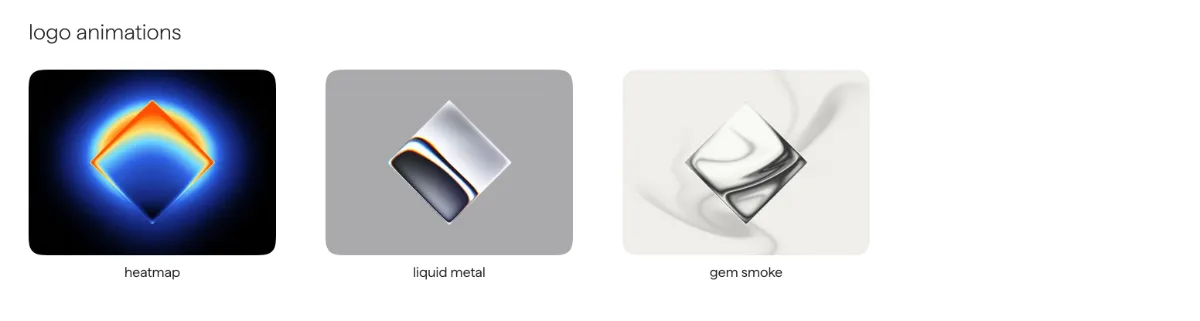
Logo Animations:
Such as heatmap, liquid metal, and gem smoke.
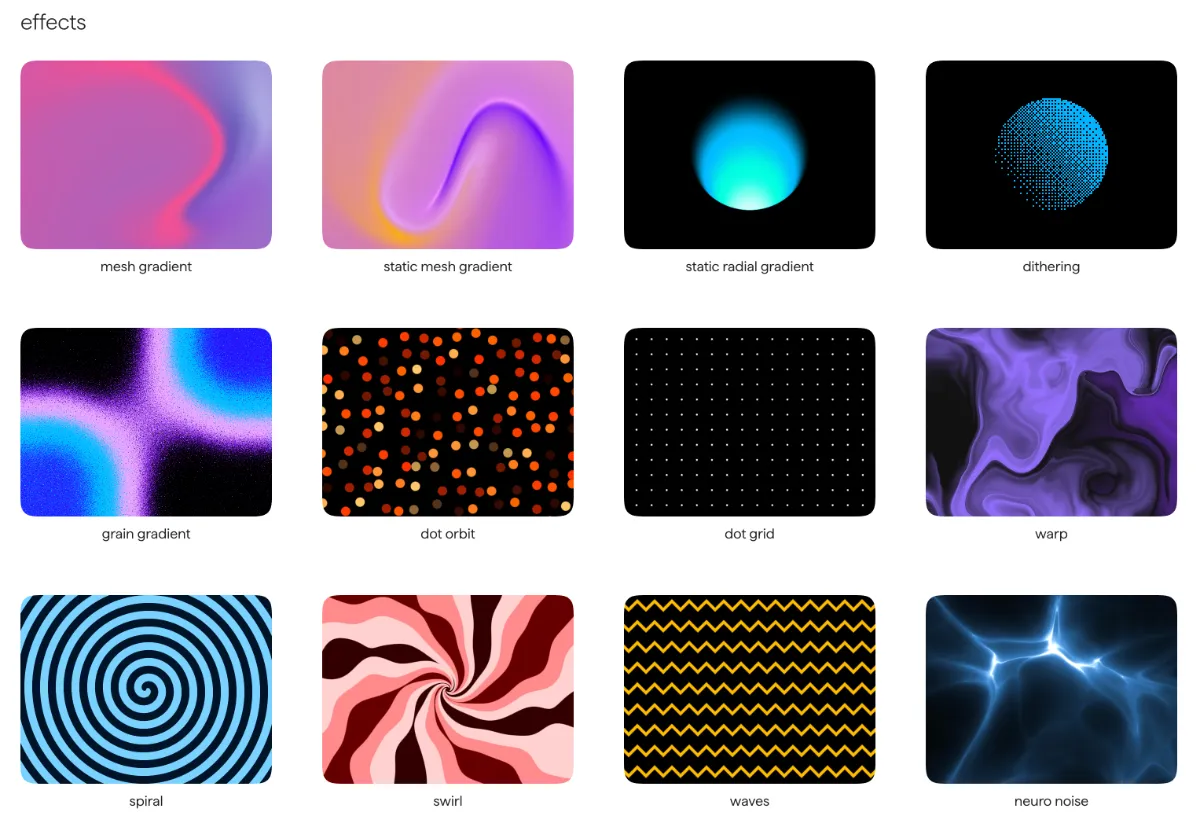
Background & Dynamic Effects:
Such as mesh gradient, static mesh gradient, grain gradient, dot orbit, warp, spiral, swirl, waves, neuro noise, perlin, simplex noise, voronoi, metaballs, god rays, etc.
These effects are perfect for:
- Landing Page hero backgrounds
- Product website Hero sections
- Logo motion designs
- Article cover image generation
- Developer tool websites
- Design-conscious SaaS pages
- Portfolio websites
- Music, gaming, and creative project pages
Compared to using static images, the advantage of Shaders is that they can render in real time, change dynamically, and generally maintain better responsive adaptability.
How to Use in React?
The React usage of Paper Shaders is very similar to standard components.
For example, here is the MeshGradient example from the official README:
1 | import { MeshGradient, DotOrbit } from '@paper-design/shaders-react'; |
As you can see from this example, it doesn't require developers to understand the full WebGL rendering pipeline beforehand. Instead, it adjusts visual presentation through parameters like colors, distortion, swirl, speed, and scale. For designers or frontend developers, this abstraction makes trial and error much easier.
A Designer-Friendly Shader Workflow
The most interesting part of Paper Shaders is not just that it "provides a bunch of Shader components," but that it attempts to bridge the gap between design tools → frontend code.
The project README mentions that one of its goals is to allow designers to use common shaders in a visual way, and the final output can be directly exported as lightweight code to be placed in any codebase.
This is actually very important.
Many web visual effects look beautiful in design drafts, but face several issues when they are actually implemented:
- Designers don't know how to describe Shader parameters;
- Developers don't want to write WebGL from scratch;
- Dynamic effects in design drafts are difficult to accurately reproduce;
- In the end, they are often replaced by videos, GIFs, or static images.
Paper Shaders' approach is to turn Shaders into a more "productized" design asset:
adjustable during the design phase, directly usable in the development phase, and not requiring heavy runtime dependencies when going live.
The Significance of Zero Dependencies
Paper Shaders officially emphasizes that it consists of zero-dependency HTML canvas shaders.
This is highly attractive for frontend projects. While many visual motion libraries are powerful, they often bring significant bundle size, complex dependency chains, and runtime overhead. For projects that just want to add a dynamic background to the homepage, add a touch of sophistication to a logo, or create a lightweight interactive effect, importing a full 3D engine can sometimes feel too heavy.
Paper Shaders has a lighter positioning:
It does not aim to replace Three.js, R3F, or professional graphics engines, but rather to provide a set of high-quality Shader effects that can be quickly embedded into web pages.
Open Source License & Commercial Use
Paper Shaders uses the Apache 2.0 License. The official documentation mentions that it can be used in commercial websites, applications, games, videos, prototypes, internal tools, and other end products, with no visible attribution required. If you redistribute the Paper Shaders code as part of another shader library, plugin, or tool, you need to retain the LICENSE and NOTICE files.
This makes it very friendly for personal projects, commercial websites, SaaS products, and internal tools alike.
Which Projects is It Suitable For?
I think Paper Shaders is particularly suitable for the following scenarios:
First, websites that want to quickly elevate their visual appeal.
For instance, AI tools, design tools, developer platforms, or SaaS product homepages. Using effects like Mesh Gradient, Grain Gradient, or God Rays can easily transform a page from looking like a "generic template" to something much more memorable.
Second, projects requiring dynamic logos or brand motion designs.
Effects like Liquid Metal, Heatmap, and Gem Smoke are perfect for brand showcases, especially for tech, creative, or design products.
Third, frontend projects that want to avoid writing low-level WebGL.
If you just want a beautiful Shader background rather than building a graphics engine from scratch, Paper Shaders' component-based encapsulation makes it much easier than writing WebGL from the ground up.
Fourth, teams with close collaboration between designers and developers.
If designers want dynamic visual effects to be directly converted into usable code rather than leaving developers to guess based on screenshots, then the direction of Paper Shaders is definitely worth keeping an eye on.
Points to Consider
Of course, it is not a silver bullet.
First, Paper Shaders is currently in version 0.0.x, and the official team explicitly recommends locking the dependency version since breaking changes may still occur at this stage.
Second, Shaders are essentially real-time rendering effects. Although the official documentation highlights lightweight and high performance, in actual projects, it is still recommended to keep in mind mobile performance, behavior on lower-end devices, battery consumption, and whether it impacts page readability.
Finally, visual effects should not be overused. Shaders are great for creating atmosphere and brand identity, but if the entire page is filled with dynamic textures, noise, and flickering gradients, it will instead hinder content readability.
Summary
Paper Shaders is a very interesting open-source project.
It wraps Shaders, which originally belonged to the realm of graphics programming, into a format closer to modern frontend components: it can be installed via npm, used in React, adjusted with parameters, and integrated with design tools. For developers looking to add dynamic backgrounds, textures, logo animations, and premium visual effects to their websites, it offers a much lighter path than writing WebGL from scratch.
It is not a massive 3D framework, but rather more like a bottle of colored ink:
You don't need to reinvent the canvas; you just drip it onto the page to give the originally flat interface a bit of fluidity, texture, and life.
Project Links
- Official Website: https://shaders.paper.design/
- GitHub: https://github.com/paper-design/shaders
Comments