
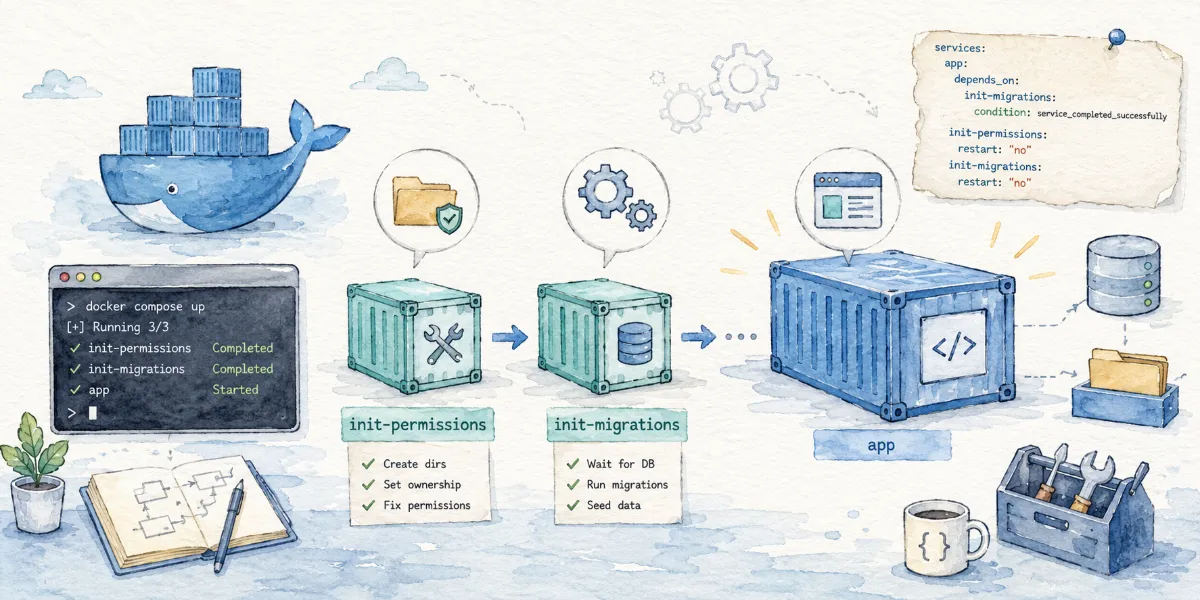
When deploying applications with Docker Compose, have you ever struggled with how to gracefully run database migrations or fix directory permissions before the main application starts?
In the past, we had to write all kinds of one-off services and chain them using complex depends_on rules. Now, with the release of the new Docker Compose features, we finally have official Init Containers support. In this post, we'll dive into how it works and how it can help us slim down our compose.yaml!
When deploying applications with Docker Compose, we often run into a very common requirement: performing some initialization tasks before the main application boots up.
For example:
- Running database migrations before starting the web service.
- Fixing mount directory permissions before running the container as a non-root user.
- Generating configuration files before the application officially launches.
- Importing initial seed data before launching the main service.
In the past, we usually defined a separate, one-off service like migrate, init, or setup, and controlled the execution order using depends_on with condition: service_completed_successfully.
Now, Docker Compose officially provides a more natural approach: Init Containers.
According to the official Docker documentation, this feature requires Docker Compose 5.3.0 or above.
Init Containers are essentially short-lived containers that execute sequentially before the main service container starts. If any step exits with a non-zero code, the main service will not start.
What Are Init Containers?
You can think of Init Containers as:
A set of initialization steps bound to run before a specific service starts.
They are not long-running services or background tasks, but rather temporary containers that "run and exit".
In Docker Compose, this capability is implemented via the pre_start lifecycle hook. According to the official documentation, each step in pre_start runs in its own independent temporary container, which executes after the service container is created but before it actually starts.
Here is a simple example:
1 | services: |
This configuration means:
- Docker Compose first creates the
appservice container. - Before
appactually starts, it runs./manage.py migrate. - If the migration command exits successfully (exiting with status code
0),appwill start. - If the migration fails,
appwill not start.
This is much cleaner than writing a separate migrate service like we used to.
How Did We Do It Before?
Before pre_start came along, if we wanted to express "run migration first, then start the application", we typically wrote it like this:
1 | services: |
While this approach works, it has several obvious issues:
- Conceptual Confusion:
migrateis not actually a long-running service; it is just an initialization step forapp. Putting it at the top-level ofservicesmakes the Compose configuration file bloated. - Residual State: Once the task is complete, it remains in the
docker compose pslist as an exited service, which litters your active service list. - Tedious Orchestration: If you have multiple initialization steps (e.g., migrating the database, seeding default data, and generating configuration files), you have to define multiple one-off services and chain them using a series of complex
depends_onrules.
With the new pre_start feature, we can consolidate them directly inside the service:
1 | services: |
Official Docker documentation highlights the following benefits of pre_start:
- Initialization logic is expressed as a sub-step of the service, rather than masquerading as a parallel, independent service.
- Completed temporary steps do not appear in
docker compose ps, keeping the environment clean. - Multiple steps are executed sequentially, eliminating the need for complex chain-like
depends_onlogic.
Example 1: Running Database Migrations Before Start
This is the most classic use case.
1 | services: |
There are two key details here:
- Dependency:
appwaits for thedbcontainer to reach aservice_healthystate viadepends_on. - Initialization Timing: Before
appstarts, it executes./manage.py migrateinside a temporary container.
If the database migration succeeds, the main app service starts; if it fails, app will not start, and the error logs will output directly within docker compose up.
This design is perfect for Django, Rails, Laravel, Prisma, Drizzle, Alembic, or any other framework that requires database schema migration before running the app.
Example 2: Fixing Volume Permissions
Another major pain point is permissions: when a service runs as a non-root user but is mounted to a Docker named volume (which defaults to root ownership), the container can crash due to lack of write access.
In the past, we had to modify the Dockerfile extensively or spin up a separate sidecar container. Now, pre_start makes it incredibly lightweight:
1 | services: |
In this example:
- The
appcontainer runs as a non-root user1000:1000. - The
pre_startstep overrides the image tobusyboxand executeschownasrootto correct the directory ownership before the main service runs.
This scenario is extremely useful in self-hosted and open-source deployments, such as:
- Fixing upload or cache directory permissions.
- Automatically initializing the structure of a data directory.
- Pre-generating default configuration files in a mounted path.
Example 3: Chaining Multiple Initialization Steps
pre_start supports defining a list of steps that will execute sequentially. The next step will run only if the previous one exits successfully (returns 0). If any intermediate step fails, subsequent steps and the main service will terminate.
For example:
1 | services: |
The entire startup flow is:
- Wait for the database container to become healthy.
- Execute the database schema migrations.
- Import initial seed data.
- Generate dynamic configuration files.
- Spin up the main application container.
Keep in mind that the steps in pre_start are not transactional. If the second step succeeds and the third one fails, Docker Compose will not roll back the second step.
Therefore, it is highly recommended to design initialization scripts with idempotent logic.
For instance, when inserting seed data:
1 | -- Not recommended: naive insert every time, which might cause primary key conflicts or duplicate data |
Execution Rules of pre_start Containers
According to the official documentation, the temporary containers spun up by pre_start behave according to these rules:
- Independent Containers: Each step runs in its own dedicated, short-lived container.
- Inherited by Default: They inherit the
imagedefined by the host service, so you don't need to specify it repeatedly. - Image Override Allowed: You can specify another lightweight utility image (like
busybox) via theimagefield. - Shared Network: They automatically join the network of the host service, giving them direct access to other dependent services declared in
depends_on. - Shared Volume Mounts: They automatically share all
volumesdeclared on the host service. - Strict Status Code Constraint: They must return exit code
0for subsequent steps and the main service to run.
These features make configurations extremely convenient. For instance, if the migration command is already bundled in the application image, you can declare it directly without specifying the image:
1 | pre_start: |
If you need a helper image (such as busybox) for file operations, just override the image in the step:
1 | pre_start: |
Since the temporary containers share the same network and volumes, any configuration file generated, permissions fixed, or data populated in the mount path will be immediately visible to the main container when it starts.
Does It Run Every Time I Execute docker compose up?
The answer is: No. This is a crucial detail to keep in mind.
According to the official Docker documentation:
- If a
pre_startstep has already run successfully in a previous deployment and its definition has not changed, Compose will automatically skip it on subsequent runs ofdocker compose up. - If a service restarts due to its
restartpolicy,pre_startwill not be triggered again. - The initialization steps will only run again if:
- The step's configuration definition changes.
- The previous execution failed (exited with a non-zero code).
- You force recreation using
docker compose up --force-recreate.
Thus, pre_start acts more like a "one-time deployment initialization" in the lifecycle of the host service, rather than a recurring process wrapper.
If you have logic that must run on every container restart, scale-up, or process launch (such as reading the latest environment variables), you should still embed it in the image's entrypoint.sh entrypoint script.
When Are Init Containers Not Suitable?
While Init Containers are highly convenient, they are not a silver bullet. According to official guidelines, if your requirement is simply to inject static configuration files or credentials, you should prioritize Docker Compose's native configs and secrets, which support direct mounts and fine-grained permissions/ownership controls.
We do not recommend using pre_start in the following scenarios:
1. Mounting Static Configuration Files
For fixed configuration files that do not need to be dynamically generated, mount them directly instead of spinning up an initialization container to write them.
Recommended Approach:
1 | configs: |
2. Sensitive Credential (Secret) Injection
Database passwords, API keys, and other sensitive tokens should never be written to a volume or filesystem using initialization scripts to avoid leakage.
Recommended Approach:
1 | secrets: |
3. Cron Jobs and Background Maintenance Tasks
For example:
- Routine data backups.
- Periodic cleanup of cache or temporary files.
- Post-termination cleanup work.
These tasks are not blocker dependencies for the main application start, and therefore should not be put in pre_start.
Current Design Limitations
Since this feature is relatively new, you should keep the following limitations in mind:
- No Per-Replica Execution:
pre_startruns once per service, not per container instance (currently, there is noper_replica: truesupport). - Incompatibility with Certain Mounts: While shared named volumes and bind mounts work perfectly,
pre_startcannot share files with main containers if you are using anonymous volumes ortmpfsmounts, which are unique to each container instance. - No Trigger on Scaling: When scaling up (e.g., running
docker compose up --scale app=3), new container instances do not triggerpre_startagain. It still follows the "config changed or forced recreation" triggering logic.
Therefore, if your initialization logic (like local cache pre-warming) must run on every replica, do not rely on pre_start for now.
Differences from Kubernetes Init Containers
Conceptually, both serve the same purpose: preparing the environment before the main workload container starts.
However, they differ in implementation and power:
- Kubernetes (K8s) Init Containers are first-class, Pod-level entities deeply integrated with cloud-native distributed scheduling, and natively support initializing each replica independently.
- Docker Compose Init Containers are implemented as a lightweight solution via the
pre_startlifecycle hook. It is geared towards single-host deployments, local development, and small-scale self-hosted environments.
Simply put, Docker Compose's Init Containers are a simplified initialization mechanism tailored specifically for Compose workloads—small but highly capable.
Best Practice Recommendations
When using pre_start in production or development environments, we recommend following these principles:
- Absolute Idempotency: Your initialization scripts must achieve "identical results over multiple runs" to handle retries and recreations cleanly.
- No Persistent Processes: Each step in
pre_startmust exit quickly with0. Long-running or daemonized processes will block the main service startup indefinitely. - Separate Production and Development Migration Strategies: While auto-running
migrateinpre_startis convenient, running migrations automatically in production carries risk. Consider triggering database migrations via an independent CI/CD pipeline for critical online environments. - Encapsulate Complex Logic in Scripts: If your initialization contains complex checks or multiple setup steps, package them into a dedicated shell script (e.g.,
./scripts/init.sh) inside the container and call it from thecompose.yamlto keep your configuration clean.
1 | pre_start: |
Conclusion
Docker Compose's Init Containers finally address a long-standing pain point in container orchestration: how to gracefully define start-up dependencies.
We can summarize the suitable and unsuitable scenarios as follows:
| Suitable ✅ | Unsuitable ❌ |
|---|---|
Automatic database migrations (migrate) |
Long-running background tasks |
| Seed data import & database initialization | Cron tasks like scheduled backups or logs cleanup |
| Adjusting host volume mount permissions | Static configuration file injection (use configs) |
| Generating local/dynamic configuration files | Sensitive credentials management (use secrets) |
| Chaining ordered validation steps | Initialization logic that must run on each replica |
Let's conclude with a side-by-side comparison of the configuration before and after this feature:
1 | services: |
1 | services: |
This is the core value of Docker Compose Init Containers: letting initialization steps gracefully return to where they truly belong.


Comments