
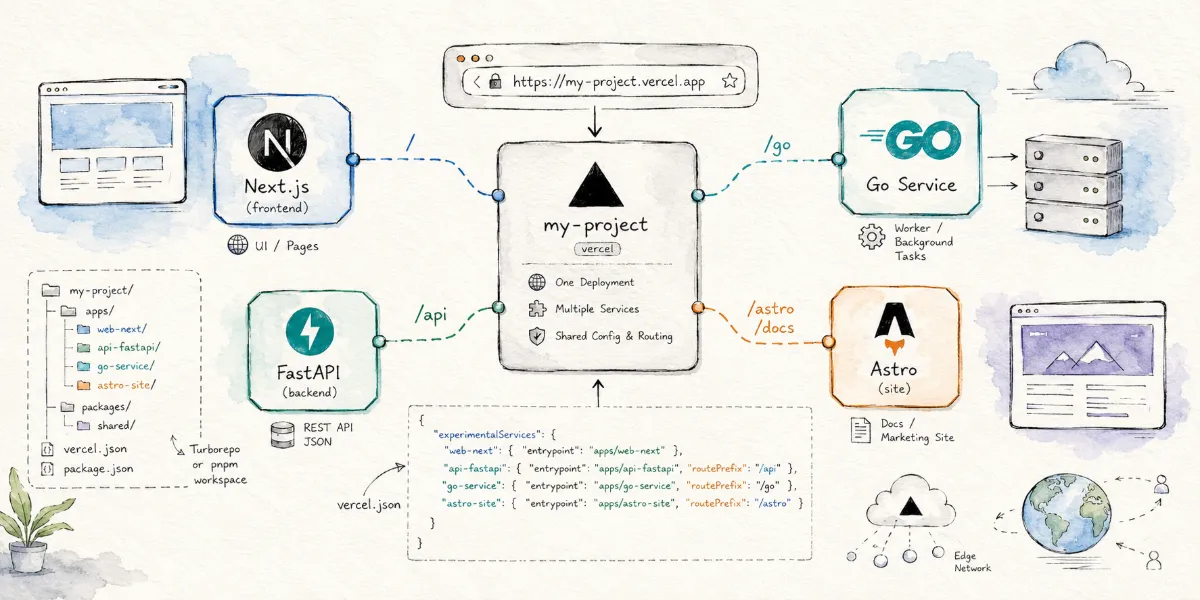
Welcome to my world! This is Mr. O. When you have a complex project with Next.js for the frontend, FastAPI for the backend, and Astro for documentation, does managing their deployment on Vercel give you a headache? Vercel recently launched Vercel Services, which officially supports running multiple independently built services within a single project. In this post, we will discuss how it works, its configuration details, and the pain points it solves.
In the past, deploying projects on Vercel was a breeze if your app was just a single Next.js, Astro, Vite, or SvelteKit project: import the repository, detect the framework, auto-build, and auto-deploy.
However, once the project gets a bit more complex, for example:
- Frontend: Next.js
- Backend: FastAPI
- Additional service: API written in Go
- Admin dashboard: Vite / React
- Documentation site: Astro or Fumadocs
The dilemma arises: should these be deployed as a single Vercel Project or split into multiple Projects? If split, managing domains, environment variables, Preview URLs, cross-service communication, CORS, and routing rules becomes highly complex.
The recently released Vercel Services is designed specifically to solve this problem: it allows you to run multiple independently built services inside a single Vercel project, and mount them under different paths of the same deployment URL.
What is Vercel Services?
Simply put, Vercel Services allows you to split a single project into multiple independent "Services".
Each Service can have its own entry point directory, framework, build commands, and runtime configurations. However, they ultimately belong to the same Vercel Project and share the same deployment domain.
For example:
1 | https://example.vercel.app/ -> Frontend application |
Previously, you might have had to create multiple Vercel Projects and link them together using environment variables or rewrite rules. Now, Vercel Services aims to let these services be deployed, previewed, and managed together within a single project.
According to Vercel's official documentation, to use a multi-service project, you need to set the project's Framework Preset to Services, and configure services (or experimentalServices in experimental phase) in the vercel.json file at the root of the project.
A Minimal Configuration Example
The basic configuration shown in the official documentation looks like this:
1 | { |
Two services are defined here:
my_frontend: Frontend service, with the root directory atfrontend/, using the Next.js framework.my_backend: Backend service, with the root directory atbackend/, and the startup entrypoint asmain:app.
Notably, the configuration includes rewrites rules to route all external requests to the frontend service my_frontend. On the other hand, my_backend does not have a public URL route configured; it can only be invoked internally via inter-service networking, making it ideal for hosting private backend APIs.
This approach is highly useful for hybrid frontend-backend projects, and is especially suited for Monorepos.
What Pain Points Does It Solve?
1. No Need to Split Frontends and Backends into Multiple Vercel Projects
Many projects start as a simple frontend site and gradually add APIs, dashboards, Webhooks, and worker services. Over time, the project directory might look like this:
1 | my-project/ |
Without Services, you might struggle with decisions like:
- Deploying
apps/webto one Vercel project - Deploying
apps/adminto another Vercel project - Deploying
backendto a different platform - Dealing with API endpoints, CORS, and environment variables across all of them
The philosophy of Services is: since these components belong to the same product, they should be deployed together as multiple services of a single Vercel Project.
2. Tailored for Polyglot (Multi-Language) Projects
Historically, Vercel provided the best developer experience primarily for the frontend and Node.js ecosystems, especially Next.js.
However, in real-world scenarios, the backend isn't always written in JavaScript. Many developers use:
- Python + FastAPI
- Go
- Node.js + Express
- Next.js
- Vite
- Astro
Vercel Services allows these services to be seamlessly integrated within a single project.
For example:
1 | apps/web -> Next.js Frontend |
Previously, projects like this felt like "stitching multiple deployments together." Now, they are treated as "multiple components of a single product."
3. Unified Preview Deployments
One of Vercel's most powerful features is Preview Deployments.
For every Pull Request submitted, a preview URL is automatically generated. If the frontend and backend are split across multiple Projects, managing the linkage between these multiple Preview URLs becomes challenging.
With Services, multiple services share a single deployment URL, distinguished by paths. This makes testing Pull Requests much more natural:
1 | https://my-project-git-feature.vercel.app/ |
This simplifies things immensely for team collaboration, product QA, and ad-hoc testing.
A More Complete Example: Next.js + FastAPI
Suppose we have a project structured as follows:
1 | my-app/ |
The vercel.json can be configured as:
1 | { |
With this configuration:
1 | / -> Next.js Frontend |
The framework field is optional. If omitted, Vercel will attempt to automatically detect the framework. However, you can explicitly specify it to ensure more stable build behavior.
Configuration Fields Reference
The core configuration fields of Vercel Services include:
entrypoint
Specifies the entry file or directory of the service.
For example:
1 | "entrypoint": "apps/web" |
Or:
1 | "entrypoint": "backend/main.py" |
routePrefix
Specifies the URL path to mount the service.
For example:
1 | "routePrefix": "/api" |
This specifies that the service will handle requests directed to /api.
framework
An optional field to specify the framework type, such as:
1 | "framework": "nextjs" |
Or:
1 | "framework": "fastapi" |
If not configured, Vercel will automatically detect it during build time.
memory and maxDuration
If a service has higher resource requirements, you can configure memory limits and execution timeout limits.
For example:
1 | { |
This is suitable for AI APIs, image processing, data transformation, or other resource-intensive services.
Which Projects Benefit Most?
Vercel Services is ideal for:
Monorepo Projects
For example:
1 | apps/web |
If you are already using pnpm workspaces, Turborepo, Nx, or similar mono-repo setups, Services will fit perfectly.
Split Frontend-Backend Projects
For projects where the frontend uses Next.js and the backend uses FastAPI:
1 | frontend/ |
Deploying this structure on Vercel was previously cumbersome, but can now be housed in a single Project via Services.
Multi-Service Architectures
For projects that require more than a single API endpoint:
1 | services/auth |
Each can be mounted under a distinct path:
1 | /auth |
Static Site + Backend API Combinations
For example:
1 | apps/site -> Static site built with Astro / Vite / Hexo |
This combination is highly attractive for personal projects, utility tools, lightweight SaaS, or documentation portals with interactive APIs.
What Does It Mean for Hexo Users?
Hexo is a static blog generator that is already very easy to deploy on platforms like Vercel, Cloudflare Pages, or GitHub Pages.
For a standard, purely static blog, Vercel Services is not necessary.
However, if your Hexo blog starts incorporating dynamic capabilities, such as:
- A custom comment system API
- A link exchange request backend
- Newsletter subscription interfaces
- AI-powered article summary APIs
- Image processing endpoints
- A private admin panel
- Standalone tools or widgets
In these cases, Services becomes highly valuable.
You can organize your project as:
1 | blog/ -> Hexo static blog |
And deploy them unified in one Vercel Project:
1 | / -> Hexo blog |
For personal site owners, this unified deployment structure is much more organized and easier to maintain than managing multiple projects.
It is Not Docker Compose
Difference from Docker Compose
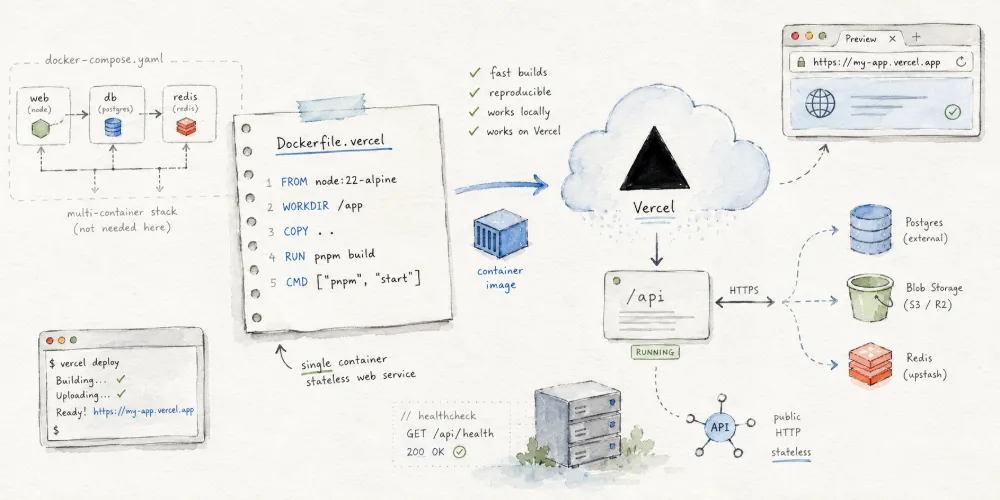
It is important to note that Vercel Services is not a replacement for Docker Compose.
Docker Compose is designed for orchestrating multiple long-running services (such as databases, Redis, background workers) in a single virtualized server environment:
1 | web |
In contrast, Vercel Services is focused on multi-service builds and routing organization on the Vercel platform. It is suitable for web applications, APIs, frontend projects, and lightweight backends, but it is not intended to run a full, traditional server environment. If your project relies on persistent databases, Redis, queues, or background processes, you still need to use external managed services or opt for VPS, Docker, or Kubernetes deployments.
Caveats and Limitations
Attention
Currently, the configuration field remains named experimentalServices, indicating that the feature is still in the experimental phase. Before using it in production, it is highly recommended to verify builds, routing, logs, environment variables, and resource limits in a test project.
Additionally, if your project consists of a single Next.js app and the APIs can be handled via Next.js API Routes or Route Handlers, Services is likely unnecessary. Services is designed specifically for projects that have multiple distinct build units.
Summary
The true value of Vercel Services is that it transitions Vercel from "one project, one framework" to "one project, multiple frameworks and services".
For modern web projects, this is a highly practical evolution.
Previously, we had to switch back and forth between multiple Vercel Projects, domains, and Preview URLs. Now, the frontend, backend, admin panel, documentation, and tools can all be deployed collectively as services in a single project.
It is particularly suited for:
- Monorepos
- Split frontend-backend applications
- Python + JavaScript hybrid stacks
- Multi-framework applications
- Personal utility sites
- Small SaaS products
- Static site + API combinations
If you have been looking to clean up the deployment structure of a complex project, Vercel Services is definitely worth checking out.


Comments