
Welcome to my world! This is Mr. O. Have you ever wished you could deploy your backend Docker services on Vercel with the same seamless experience as deploying a frontend? Today, that wish comes true! Vercel recently announced official support for running Dockerfile directly. This is a game-changer for backend developers. In this post, we will take a deep dive into this major update, its suitable use cases, and the underlying Fluid Compute mechanism.
Vercel recently announced official support for deploying applications via Dockerfile. Developers can now add Dockerfile.vercel to their projects, allowing Vercel to automatically build, store, and deploy the container image, and run the application on Fluid Compute.
This update means that Vercel is no longer just a platform optimized for Next.js, frontend applications, and Serverless Functions. Instead, it is expanding further toward custom backend services and general-purpose web application runtimes.
Note
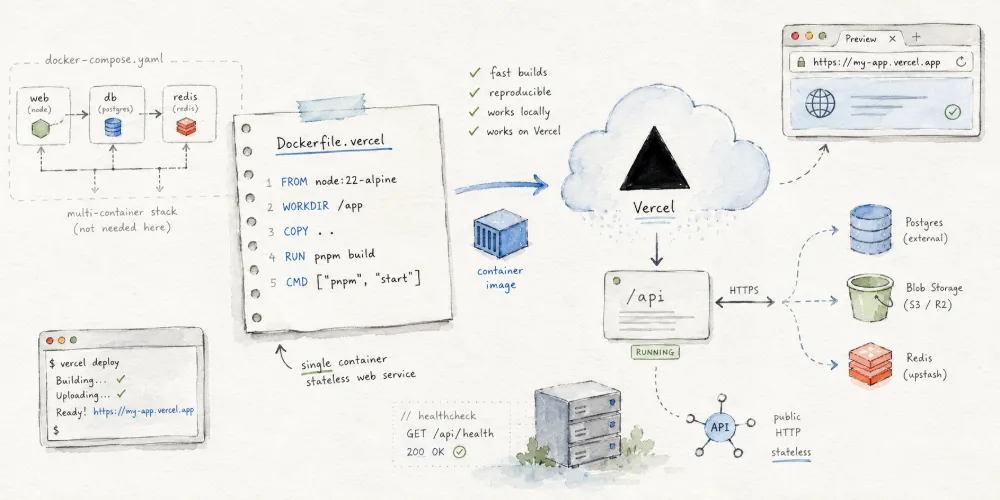
This does not mean Vercel can run any Docker application. More precisely, Vercel supports stateless applications that use a Dockerfile to describe their build process and run as HTTP services.
The application must listen to the port injected by the platform, and offload persistent states such as databases, files, and caches to external services.
What is a Dockerfile?
A Dockerfile is a text file that describes "how to build a Docker image."
It typically specifies the base OS or runtime image, dependencies to install, files to copy, build commands to run, and the command to execute when the container starts. In short, a Dockerfile is not the application itself, but the instruction manual for the application's runtime environment.
For example, a Dockerfile for a Node.js web service might look like this:
1 | FROM node:22-alpine |
This file instructs the builder to: use Node.js 22 as the base environment, install dependencies, copy project code, run the build, and finally start the application.
For developers, the greatest value of a Dockerfile is its "reproducibility." As long as the Dockerfile is well-defined, the application can be built into a relatively identical runtime environment, whether locally, in CI/CD, on a cloud platform, or on other servers.
This is exactly why Vercel supporting Dockerfile is so significant: when the platform cannot automatically detect how a project should be built and run using standard frameworks, developers can now use a Dockerfile to tell Vercel exactly how to do it.
What is the Difference Between Dockerfile and docker-compose.yaml?
Many people get Dockerfile and docker-compose.yaml mixed up, but they actually address two different levels of containerization.
A Dockerfile is responsible for "building a single image," whereas a docker-compose.yaml is responsible for "orchestrating multiple containers."
For example, a complete web application might require:
- A Next.js frontend;
- An Express API;
- A PostgreSQL database;
- A Redis cache;
- A MinIO object storage.
Within this stack, the Express API itself can have a Dockerfile describing how to build the API image. The docker-compose.yaml file, on the other hand, is responsible for starting the API, database, Redis, and MinIO services together, configuring their ports, environment variables, volumes, and network relationships.
Here is a quick comparison:
| Project | Dockerfile | docker-compose.yaml |
|---|---|---|
| Primary Role | Build a single image | Start and orchestrate multiple containers |
| Focus | How the app is packaged, dependencies installed, and started | How multiple services work together |
| Common Instructions | FROM, RUN, COPY, CMD | services, ports, volumes, networks |
| Best Suited For | Defining the runtime environment of a single app | Local development, multi-container deployments, service orchestration |
| Includes Database Orchestration | Usually not | Can include PostgreSQL, Redis, etc. |
| Vercel's Focus in This Update | Yes | No, this is not traditional Compose deployment |
Core Difference
Vercel is supporting Dockerfile in this update, not turning Vercel into a VPS that can directly run a full docker compose up -d stack.
You can deploy an HTTP service to Vercel via a Dockerfile, but you cannot move a whole Compose stack containing databases, Redis, background workers, object storage, and admin panels directly onto Vercel without modification.
What Types of Docker Applications Does Vercel Support?
According to Vercel's official documentation, backend frameworks like Express and Fastify will run as Vercel Functions and default to Fluid Compute, which allows applications to scale automatically based on traffic and support higher concurrency.
Based on the usage model, a Dockerfile application suitable for deployment on Vercel typically has the following characteristics:
- It is a web service or API service;
- It exposes its capabilities via HTTP;
- It listens to the port provided by the platform;
- It is stateless;
- It offloads databases, file uploads, caching, queues, etc., to external hosted services.
Let's look at a tabbed comparison of what types of applications are suitable and unsuitable for Vercel:
| App Type | Examples |
|---|---|
| Web Backend API | Express, Hono, Fastify, FastAPI, Go HTTP Server |
| Full-Stack Web App | Next.js, Nuxt, SvelteKit, TanStack Start |
| Content Sites | Blogs, Documentation sites, Corporate sites, CMS frontends |
| Bot / Webhook Services | Slack Bot, GitHub Webhooks, MCP Servers |
| AI Tool Backends | Chatbot APIs, Agent control layers, Image processing entrypoints |
| Lightweight Internal Tools | Dashboards, Admin Panels, Data query interfaces |
| App Type | Reasons |
|---|---|
| PostgreSQL, MySQL, Redis | Require persistent state and disk storage |
| 1Panel, Baota, CasaOS | Rely on a complete server environment and system-level privileges |
| Docker Compose Multi-container Stacks | Vercel is not a traditional container orchestrator |
| BT Downloaders, NAS Tools | Typically require long-running processes and local persistent storage |
| Game Servers, VPNs, Proxies | Do not fit the standard HTTP web application model |
| Apps Heavily Dependent on Local Disk | Container instances should be treated as stateless |
In other words, while Vercel supporting Dockerfile expands its deployment scope, it is still not a VPS nor a replacement for Kubernetes.
Analyzing Suitable Scenarios via Vercel Templates
We can also look at the Vercel Templates page to see that the platform still primarily targets web applications, backend APIs, AI applications, and full-stack projects rather than traditional server software. Vercel's Backend Templates already include Hono, Express, Elysia, MCP Server, Slack Bolt, and other templates, all of which are lightweight HTTP services, bot backends, webhook services, or AI tool backends.
Under Starter Templates, you will find Next.js, Nuxt, SvelteKit, Rust Hello World, Rust Axum, TanStack Start, and Slack Bolt with Hono. This indicates that Vercel aims to cover not just frontend pages, but also backend programs that expose capabilities via HTTP.
Payload Website Starter is another classic example. This template features admin panels, authentication, content publishing, draft previewing, SEO, search, redirects, scheduled publishing, etc., but it pairs with Neon Database and Vercel Blob Storage to handle database and file storage externally.
This demonstrates Vercel's recommended architecture: keep computing on Vercel, and offload state to external hosted services.
Why is This Update Important?
In the past, Vercel's best experience was concentrated on Next.js and the frontend ecosystem. Although Vercel supported various Serverless Functions and backend frameworks, if a project required custom system dependencies, custom startup commands, non-standard frameworks, FFmpeg, Chromium, nginx, or other complex runtime environments, it required extra refactoring.
Dockerfile support fills this gap.
Developers no longer have to adapt entirely to Vercel's framework detection logic. Instead, they can describe how their application builds and starts using a Dockerfile. For traditional backend projects, cross-language services, AI tool backends, and custom web servers, this significantly lowers migration costs.
Furthermore, once deployed to Vercel, applications still benefit from Vercel's native engineering experience, such as Git integration, Preview Deployments, automatic scaling, logging, analytics, instant rollbacks, and platform-level security. Vercel's Functions documentation also highlights that the platform automatically optimizes builds based on the framework, offering a low-maintenance operational experience via CDN and function runtimes.
Fluid Compute: Between Serverless and Servers
A core pillar behind Vercel's Dockerfile support is Fluid Compute.
According to Vercel's documentation, Fluid Compute is a compute model positioned between traditional Serverless and full servers. It retains the auto-scaling and low-maintenance benefits of Serverless while adding server-like capabilities, such as allowing a single instance to handle multiple concurrent requests.
This is highly beneficial for AI applications, API services, and I/O-intensive tasks. In many cases, a request spends most of its time waiting for a database, vector database, external API, or model service to respond rather than performing heavy CPU computation. Fluid Compute's concurrency model allows a single instance to handle other tasks during these waiting periods.
Vercel's Fluid Compute documentation also mentions support for Node.js, Python, Edge, Bun, and Rust runtimes, making it ideal for scenarios that need to optimize concurrency and mitigate cold-start impacts.
Pricing: Pay-as-you-go Based on Actual Resource Usage
In Vercel's Fluid Compute billing documentation, resource consumption is calculated using CPU and memory dimensions. For instance, if an instance lives for 10 seconds to handle a request, but the active CPU time is only 4 seconds, the cost is split into CPU usage and memory occupancy.
This means Vercel does not charge based on the traditional VPS model of "buying a machine that runs 24/7." Instead, it is much closer to the pay-as-you-go model of cloud functions based on requests and resource consumption.
Cost Considerations
For web services with low-frequency access, traffic spikes, or significant I/O waiting time, this pricing model can be much more cost-effective. However, for services requiring 24/7 high-load operations or continuous CPU/memory utilization, traditional VPS, dedicated servers, or Kubernetes remain more suitable options.
Not a VPS, but Makes Vercel a More Complete Application Platform
With Vercel supporting Dockerfile, the most common misunderstanding is: "Does this mean any Docker app can be deployed to Vercel?"
The answer is no.
It cannot replace a VPS, nor can it replace Docker Compose or Kubernetes. It is designed for deploying single web services, API services, full-stack applications, or AI tool backends—not for running complex, long-running, local-storage-dependent, or system-privilege-heavy server environments.
Key points are that this update remains incredibly significant because it extends Vercel's boundaries from "framework-friendly frontend and full-stack apps" to "general HTTP backend services."
For developers, the ideal workflow might look like this:
- Frontend pages deployed on Vercel;
- Backend API deployed on Vercel via a Dockerfile;
- PostgreSQL hosted on Neon, Supabase, or another managed database;
- File storage using Vercel Blob, S3, or R2;
- Caching and queueing handled by external hosted Redis or message queues;
- Automatic Preview environments generated on every Git push.
This represents a modern way of deploying cloud applications: instead of maintaining servers, the application is divided into managed components for compute, database, object storage, caching, and queuing.
Conclusion
Vercel's support for Dockerfile is far more than just "supporting Docker."
What it truly changes is how developers can deploy custom HTTP services to Vercel in a standardized, universal way. For projects that cannot be automatically recognized by framework detection but are essentially web services at heart, the Dockerfile offers a direct path to the cloud.
However, Dockerfile on Vercel is not Docker Compose on Vercel, nor is it VPS on Vercel.
It is suited for stateless HTTP applications rather than full server environments.
If Vercel's historic strength was its frontend deployment experience, this Dockerfile support brings that same developer experience to backend services: write once, submit, auto-build, auto-preview, auto-scale, and release—all on a single platform.


Comments