
There's a famous internet meme about an 8-year-old user sitting in front of a computer, registering the email account that will accompany them for life.
At 8 years old, we didn't know what a digital identity was, nor did we know that this email would be used in the future to register for GitHub, link bank cards, submit resumes, receive verification codes, and log into all sorts of services. We simply thought: adding our birthday, nickname, favorite anime character, or a few cool-looking numbers to the email prefix would be awesome.
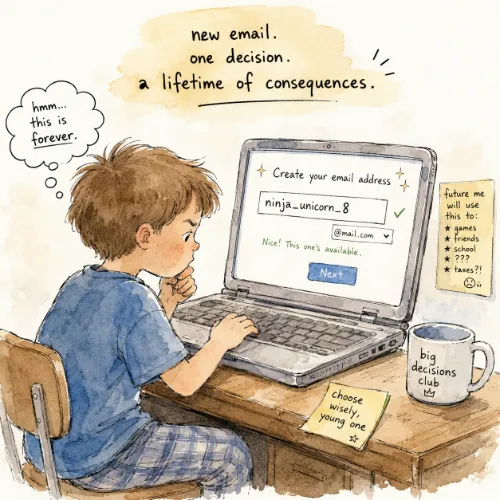
And then twenty years passed.
You've grown up, changed your avatar, changed your screen name, changed your phone, and even changed your aesthetic several times, but that email address is still there. Every time you need to fill in your email address in a formal setting, you have to pretend it is perfectly normal.
The good news is: Google has finally started allowing users to change their Gmail addresses.
Why Was This So Painful Before?
In the past, if you registered a Gmail address, it basically meant that this address would stick with your Google account for a very long time.
You could change your username, your avatar, your recovery email, and various personal details, but the email address itself was usually very difficult to change. For many people, the most realistic way to get a more formal, easier-to-remember, and less embarrassing Gmail address was often:
Registering a new Google account.
But problems followed.
The old account might contain Gmail emails, Google Drive files, Google Photos, YouTube data, Google Play records, and login records for various third-party websites. Registering a new account isn't just about changing an email address; it's almost like reorganizing your entire internet life.
So many people finally chose to put up with it.
Putting up with the email registered at age 8 continuing to appear on resumes, contracts, project backends, and login pages.
How Can You Change It Now?
According to Google's instructions, users can now change their original Google account email ending in @gmail.com to a new @gmail.com address.
On the Gmail page, click your avatar in the upper right corner, then click Manage your Google Account to open the Google account settings page. Click Personal info on the left, and you can make the change in the Contact info -> Email section on the right.
After the change, the original Gmail address won't disappear completely; instead, it will become an alternate email for the account. You can still receive emails sent to the old address, and the data in your account won't be lost due to the email change, including historical emails, photos, files, and other content.
Simply put:
You can finally get a new Gmail house number, but your old house number can still receive mail for you.
This is very important for long-time users. Because it doesn't require you to abandon your old account and start over, but rather gives you a chance to rename yourself while keeping your account assets.
Some Websites Have Encountered Problems
Although this sounds great, I don't recommend rushing in to change it right after seeing the option.
Since the old email can still receive emails normally, for accounts registered on other websites using this email, you actually don't need to make any adjustments and can continue using it.
After the Gmail address becomes modifiable this time, the most notable issue is not Google itself, but the one-click logins of third-party websites. Current feedback shows that after changing the email, using the Google account to one-click login to websites like V2EX and Spotify again will directly create a new account.
Theoretically, when logging in with a Google account, Google returns a set of user information. The truly stable part suitable for identifying account identity should be the Google account's Provider ID, which is the unique identifier of this Google user in Google's identity system.
Email is just an email address.
But in reality, some website developers might conveniently use the Email directly as the user's unique ID. This seemed fine in an era when emails could never be changed; but once the email can be modified, the problem will be exposed.
For example:
You originally used [email protected] to log into a certain website via Google.
Later you changed your Gmail address to [email protected].
If this website uses the Provider ID returned by Google to identify you, then the next time you log in, it will still know you are the original account.
But if this website takes a shortcut and directly uses the Email to identify users, then it might think:
"This is a new email, so this is a new user."
As a result, even though you are clearly using the same Google account, you might log into a completely new, empty account, or even encounter issues like account loss, unassociated data, and abnormal subscription status.
Even worse, if some systems improperly handle the logic of old email release, reuse, or binding, it could lead to more complex security issues.
Known popular websites that will encounter such issues include V2EX, Spotify, etc.
Checklist for Confirming the Scope of Changes
If you wish to change the bound email for other websites, it is recommended to at least check these categories of places before changing, to confirm whether the account is associated via email registration or one-click login:
- 1. Commonly used third-party login services:
Such as GitHub, Notion, Figma, Cloudflare, Vercel, various forums, blog backends, developer platforms, etc. - 2. Financial, payment, and billing services:
Such as bank notifications, subscription services, cloud service bills, domain registrars, server providers, etc. - 3. Important account recovery channels:
Some websites use your email as the core channel for password recovery, identity verification, and receiving security notifications. - 4. Work and public profiles:
Such as resumes, personal websites, business cards, Git commit information, project READMEs, blog About pages, etc.
Although Google will let the old email continue to receive mail, it's not guaranteed that third-party websites will correctly recognize "this is the same person."
Advice for General Users
If you plan to change your Gmail address, you can first sort out your most commonly used and important websites, and confirm on which sites you have used the Sign in with Google service. After changing your email, prioritize testing whether these services can still be logged into normally and whether the account data is still there.
For particularly important services, it's best to confirm in advance whether they support changing the login email, or whether alternative login methods can be bound, such as passwords, passkeys, alternate emails, phone numbers, etc.
If you encounter a website that identifies you as a new user after the change, you can try contacting customer service or the developer, explaining that you are using the same Google account and only the Gmail address has changed.
Advice for Developers
If your website supports Google one-click login, please do not use Email as the user's unique identity identifier.
You should use the stable user ID returned by Google OAuth / OpenID Connect to bind the user account, rather than treating the Email as the primary key.
Email can serve as display information, contact information, and notification address, but it should not serve as the sole identity basis for third-party login accounts.
The correct practice should be:
- Use
Provider IDto identify the user's identity - Save Email only as a mutable attribute
- When the user's email changes, update the email field instead of creating a new account
- Ensure good compatibility for historical account binding logic
- Provide clear prompts for email changes, account merging, and login anomalies
Previously, many developers used Email as the unique ID because emails seemed immutable. But now this premise is disappearing.
Use a Password Manager
When many people registered accounts in their early years, not only were their emails chosen casually, but their passwords might also have been the same set: a common password, combined with the website name, birthday, and a few symbols, slightly deformed and reused everywhere. It seemed very convenient before, but as soon as one of the websites leaks, other accounts might suffer together.
So if you haven't used a password manager yet, now is a great juncture to tidy things up.
The core value of a password manager isn't simply to "help you remember passwords", but rather:
- Use independent random passwords for every website
- You don't need to remember dozens or hundreds of passwords yourself
- It can auto-fill, reducing typing errors and phishing risks
- It can uniformly check for weak, reused, and compromised passwords
- It can more conveniently store recovery codes, keys, bank cards, server info, and other sensitive content
Common choices include 1Password, Bitwarden, KeePassXC, iCloud Keychain, etc.
If you are just a regular user and primarily use Apple devices, iCloud Keychain is sufficient; if you want a more complete cross-platform experience, you can consider 1Password or Bitwarden; if you care more about open source, self-hosting, and data control, I would recommend Bitwarden more.
If you are just a regular user who doesn't want to maintain a server, directly using 1Password or Bitwarden's official service is fine. Bitwarden's pricing is quite friendly, with a Premium annual fee of only $19.80 USD.
If you have your own server, NAS, Homelab, or are already using Docker to deploy services, then self-deploying Bitwarden is well worth a try.
Regardless of which one you choose, these things are the most important:
- The master password must be long enough, preferably a passphrase only you know
- Enable two-step verification, prioritizing Passkeys, hardware security keys, or TOTP
- Regularly export encrypted backups, and ensure you can genuinely restore them
- Don't put your password vault, backup files, and 2FA all in the same place
- Before changing your Gmail address, sort out the login and recovery methods of your important websites
Email addresses can be changed, passwords can be reset, but if your password vault and 2FA are lost together, that's real trouble.
Conclusion
Google opening up Gmail address modification is something very worth celebrating for many long-time users.
It gives us a chance to reconcile with our childhood cringe history, and also gives those emails casually registered in early years a chance to finally become more formal, easier to remember, and more suitable for long-term use.
Before starting the change, make sure to check your important accounts, especially third-party one-click logins, to reduce the chances of encountering problems.


Comments